
BP_Biome icon
BP_Biome

Biome

Spawn and Manage PCG Biome

BP_Biome — Spawns biomes such as forests, meadows, deserts, and fields, depending on the assets you own, while also managing biome intersections. It’s flexible and efficient, offering adjustable parameters and multiple presets stored in Data Tables. For more details, see Biome Presets.

Biome preview
Each farm or garden has the same set of options
Biome
Biome preset
Data Table Dropdown
Biome presets and parameters are stored in data tables. For more info visit Biome Presets.
Row Name Dropdown
Each biome has multiple presets such as "Dense Forest", "Dead Forest", or "Forest with Meadows". Select the preset here.
Quality Preset Dropdown
Changes biome generation quality. It affects foliage density, draw distances, WPO, shadows, and GI. High preset targets 60–70 FPS on an RTX 4090 at 4K resolution with 50% Epic settings. The Cinematic preset has the same foliage density as High, but it disables mesh culling — all meshes cast real shadows and affect GI. Use it for cinematics. The Lowest preset has WPO disabled.
Landscape Dropdown
Pick desired landscape here if your level has multiple. When level is partitioned, leave this field unchanged.
Runtime Checkbox
EXPERIMENTAL FEATURE! Forces all meshes to be spawned at runtime instead of storing them in the level. Greatly improves loading times. For more info.
Seed Value
Affects generation outcome. Each seed produces a different biome layout.
Spawn Options
FX
Sound Checkbox
Ambient sound actors.
Particles Checkbox
Particle actors like insects, falling leaves, etc., if present in the biome.
Garden
Rows Dropdown
Number of garden rows on each side of the center.
Row Distance Dropdown
Distance between garden rows.
Garden Bed Checkbox
Garden bed on top of the field.
Border Checkbox
Garden border.
Border Width Slider
Garden border width.
Plants
Amount Slider
Plants amount.
Distance Dropdown
Distance between plants.
Scale Slider
Plants scale.
Position Random Slider
Amount of random offset to plant positions.
Direction Slider
Direction which plants face. Used for directional species such as sunflowers.
Direction Random Slider
Random variation to plant facing direction.
Weed Slider
Particle actors like insects, falling leaves, etc., if present in the biome.
Allign to Landscape Checkbox
Aligns plants to the landscape’s surface angle.
Spline
Accuracy Slider
Distance between points when resampling the spline. More points increase accuracy but can reduce editor viewport performance. Biome Presets.
Double Resample Dropdown
Performs an extra resampling pass for smoother splines. Recommended only if visual inconsistencies are noticeable.
Hide All Splines Dropdown
Hides all spline components in the editor viewport.
Preview
Dynamic Spline Preview Checkbox
Updates the spline in real time during editing, which may impact viewport performance.
Controls
Help Button
Opens the Documentation page.
Clear PCG Link Button
Removes all PCG logic and creates Instanced Static Mesh Components out of the biome’s meshes.
Remove Button
Removes the biome.
Spawn Button
Spawns the biome.
Regeneration
Pause Button
Stops dynamic updates. Any changes within the editor, like spline or landscape adjustments, parameter changes, etc., will not force the biome to update.
Resume Button
Resumes dynamic updates.
Biome preview
Each forest or bushes strip has the same set of options
Biome
Biome preset
Data Table Dropdown
Biome presets and parameters are stored in data tables. For more info visit Biome Presets.
Row Name Dropdown
Each biome has multiple presets such as "Dense Forest", "Dead Forest", or "Forest with Meadows". Select the preset here.
Quality Preset Dropdown
Changes biome generation quality. It affects foliage density, draw distances, WPO, shadows, and GI. High preset targets 60–70 FPS on an RTX 4090 at 4K resolution with 50% Epic settings. The Cinematic preset has the same foliage density as High, but it disables mesh culling — all meshes cast real shadows and affect GI. Use it for cinematics. The Lowest preset has WPO disabled.
Landscape Dropdown
Pick desired landscape here if your level has multiple. When level is partitioned, leave this field unchanged.
Runtime Checkbox
EXPERIMENTAL FEATURE! Forces all meshes to be spawned at runtime instead of storing them in the level. Greatly improves loading times. For more info.
Seed Value
Affects generation outcome. Each seed produces a different biome layout.
Spawn Options
FX
Sound Checkbox
Ambient sound actors.
Particles Checkbox
Particle actors like insects, falling leaves, etc., if present in the biome.
Forest
Trees Slider
Trees and bushes amount.
Grass Slider
Grass and weed amount.
Spline
Accuracy Slider
Distance between points when resampling the spline. More points increase accuracy but can reduce editor viewport performance. Biome Presets.
Double Resample Dropdown
Performs an extra resampling pass for smoother splines. Recommended only if visual inconsistencies are noticeable.
Hide All Splines Dropdown
Hides all spline components in the editor viewport.
Preview
Dynamic Spline Preview Checkbox
Updates the spline in real time during editing, which may impact viewport performance.
Controls
Help Button
Opens the Documentation page.
Clear PCG Link Button
Removes all PCG logic and creates Instanced Static Mesh Components out of the biome’s meshes.
Remove Button
Removes the biome.
Spawn Button
Spawns the biome.
Regeneration
Pause Button
Stops dynamic updates. Any changes within the editor, like spline or landscape adjustments, parameter changes, etc., will not force the biome to update.
Resume Button
Resumes dynamic updates.
BP_Biome icon
BP_Road

Road

Spawn and Manage PCG Biome

BP_Biome — Spawns biomes such as forests, meadows, deserts, and fields, depending on the assets you own, while also managing biome intersections. It’s flexible and efficient, offering adjustable parameters and multiple presets stored in Data Tables. For more details, see Biome Presets.
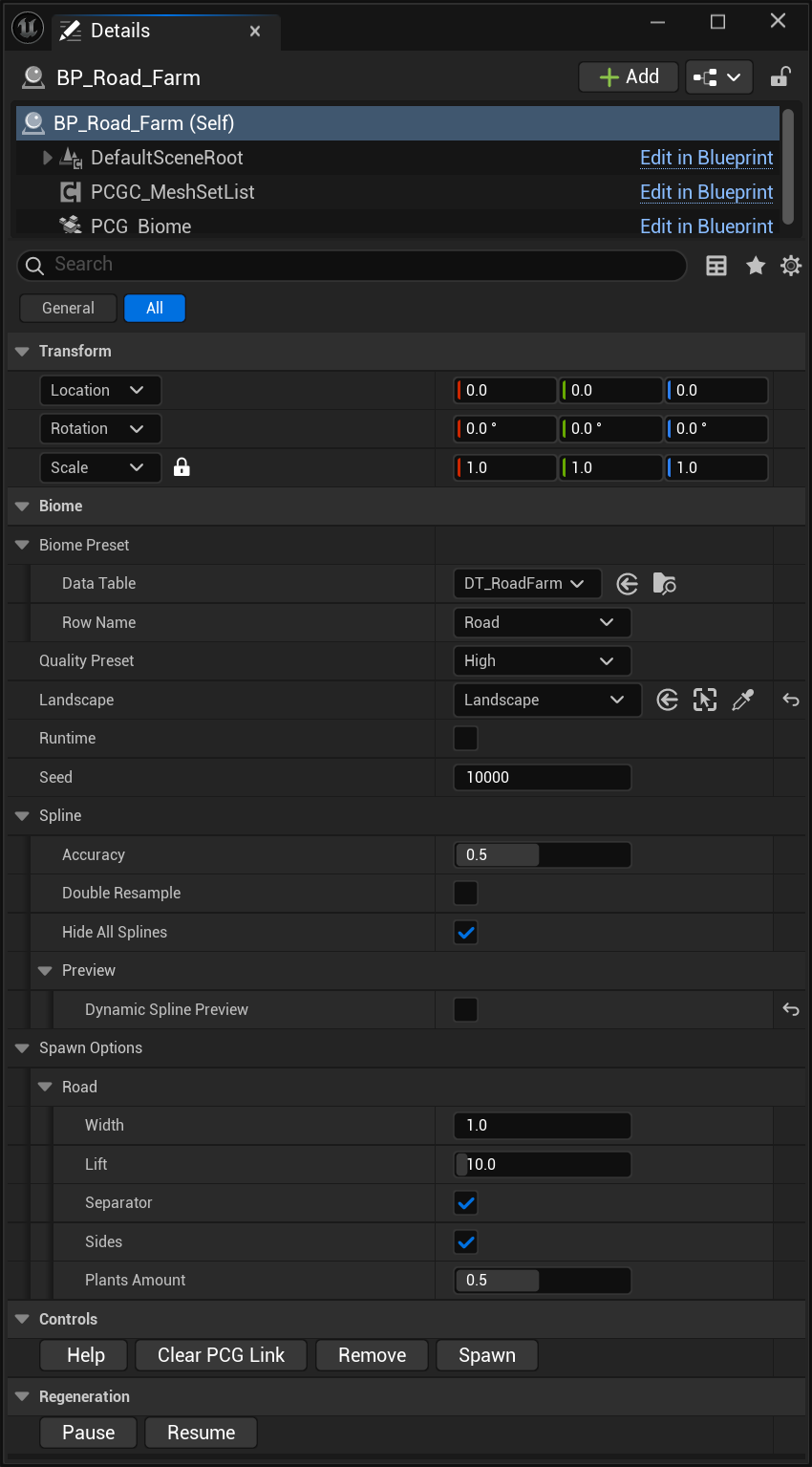
Biome preview
Each road or path has the same set of options
Biome
Biome preset
Data Table Dropdown
Biome presets and parameters are stored in data tables. For more info visit Biome Presets.
Row Name Dropdown
Each biome has multiple presets such as "Dense Forest", "Dead Forest", or "Forest with Meadows". Select the preset here.
Quality Preset Dropdown
Changes biome generation quality. It affects foliage density, draw distances, WPO, shadows, and GI. High preset targets 60–70 FPS on an RTX 4090 at 4K resolution with 50% Epic settings. The Cinematic preset has the same foliage density as High, but it disables mesh culling — all meshes cast real shadows and affect GI. Use it for cinematics. The Lowest preset has WPO disabled.
Landscape Dropdown
Pick desired landscape here if your level has multiple. When level is partitioned, leave this field unchanged.
Runtime Checkbox
EXPERIMENTAL FEATURE! Forces all meshes to be spawned at runtime instead of storing them in the level. Greatly improves loading times. For more info.
Seed Value
Affects generation outcome. Each seed produces a different biome layout.
Spline
Accuracy Slider
Distance between points when resampling the spline. More points increase accuracy but can reduce editor viewport performance. Biome Presets.
Double Resample Dropdown
Performs an extra resampling pass for smoother splines. Recommended only if visual inconsistencies are noticeable.
Hide All Splines Dropdown
Hides all spline components in the editor viewport.
Preview
Dynamic Spline Preview Checkbox
Updates the spline in real time during editing, which may impact viewport performance.
Spawn Options
Road
Width Slider
Road width.
Lift Slider
Road lift above landscape.
Separator Checkbox
Gives the road a track-like appearance.
Sides Checkbox
Extended road border.
Plants Amount. Slider
Amount of wild weed and plants.
Controls
Help Button
Opens the Documentation page.
Clear PCG Link Button
Removes all PCG logic and creates Instanced Static Mesh Components out of the biome’s meshes.
Remove Button
Removes the biome.
Spawn Button
Spawns the biome.
Regeneration
Pause Button
Stops dynamic updates. Any changes within the editor, like spline or landscape adjustments, parameter changes, etc., will not force the biome to update.
Resume Button
Resumes dynamic updates.
BP_Biome icon
BP_Biome

Biome

Spawn and Manage PCG Biome

BP_Biome — Spawns biomes such as forests, meadows, deserts, and fields, depending on the assets you own, while also managing biome intersections. It’s flexible and efficient, offering adjustable parameters and multiple presets stored in Data Tables. For more details, see Biome Presets.

Biome preview
Each land biome has the same set of options
Biome
Biome preset
Data Table Dropdown
Biome presets and parameters are stored in data tables. For more info visit Biome Presets.
Row Name Dropdown
Each biome has multiple presets such as "Dense Forest", "Dead Forest", or "Forest with Meadows". Select the preset here.
Quality Preset Dropdown
Changes biome generation quality. It affects foliage density, draw distances, WPO, shadows, and GI. High preset targets 60–70 FPS on an RTX 4090 at 4K resolution with 50% Epic settings. The Cinematic preset has the same foliage density as High, but it disables mesh culling — all meshes cast real shadows and affect GI. Use it for cinematics. The Lowest preset has WPO disabled.
Landscape Dropdown
Pick desired landscape here if your level has multiple. When level is partitioned, leave this field unchanged.
Runtime Checkbox
EXPERIMENTAL FEATURE! Forces all meshes to be spawned at runtime instead of storing them in the level. Greatly improves loading times. For more info.
Seed Value
Affects generation outcome. Each seed produces a different biome layout.
Spawn Options
FX
Sound Checkbox
Ambient sound actors.
Particles Checkbox
Particle actors like insects, falling leaves, etc., if present in the biome.
Garden
Rows Dropdown
Number of garden rows on each side of the center.
Row Distance Dropdown
Distance between garden rows.
Garden Bed Checkbox
Garden bed on top of the field.
Border Checkbox
Garden border.
Border Width Slider
Garden border width.
Plants
Amount Slider
Plants amount.
Distance Dropdown
Distance between plants.
Scale Slider
Plants scale.
Position Random Slider
Amount of random offset to plant positions.
Direction Slider
Direction which plants face. Used for directional species such as sunflowers.
Direction Random Slider
Random variation to plant facing direction.
Weed Slider
Particle actors like insects, falling leaves, etc., if present in the biome.
Allign to Landscape Checkbox
Aligns plants to the landscape’s surface angle.
Spline
Accuracy Slider
Distance between points when resampling the spline. More points increase accuracy but can reduce editor viewport performance. Biome Presets.
Double Resample Dropdown
Performs an extra resampling pass for smoother splines. Recommended only if visual inconsistencies are noticeable.
Hide All Splines Dropdown
Hides all spline components in the editor viewport.
Preview
Dynamic Spline Preview Checkbox
Updates the spline in real time during editing, which may impact viewport performance.
Controls
Help Button
Opens the Documentation page.
Clear PCG Link Button
Removes all PCG logic and creates Instanced Static Mesh Components out of the biome’s meshes.
Remove Button
Removes the biome.
Spawn Button
Spawns the biome.
Regeneration
Pause Button
Stops dynamic updates. Any changes within the editor, like spline or landscape adjustments, parameter changes, etc., will not force the biome to update.
Resume Button
Resumes dynamic updates.
Biome preview
The river biome differs only in the "Spawn Options" section
Biome
Spawn Options
Water
Water Checkbox
Water surface and duckweed.
FX
Sound Checkbox
Ambient sound actors.
Particles Checkbox
Particle actors like insects, falling leaves, etc., if present in the biome.
BP_Biome icon
BP_Biome_River

Water Biome

Spawn and Manage Water PCG Biome

BP_Biome — Spawns water biomes such as rivers, lakes, and swamps, depending on the assets you own, while also managing intersections with land biomes. It’s flexible and efficient, offering adjustable parameters and multiple presets stored in Data Tables. For more details, see Biome Presets.

Biome preview
Each land biome has the same set of options
Biome
Biome preset
Data Table Dropdown
Biome presets and parameters are stored in data tables. For more info visit Biome Presets.
Row Name Dropdown
Each biome has multiple presets such as "Dense Forest", "Dead Forest", or "Forest with Meadows". Select the preset here.
Quality Preset Dropdown
Changes biome generation quality. It affects foliage density, draw distances, WPO, shadows, and GI. High preset targets 60–70 FPS on an RTX 4090 at 4K resolution with 50% Epic settings. The Cinematic preset has the same foliage density as High, but it disables mesh culling — all meshes cast real shadows and affect GI. Use it for cinematics. The Lowest preset has WPO disabled.
Landscape Dropdown
Pick desired landscape here if your level has multiple. When level is partitioned, leave this field unchanged.
Fill Entire Landscape Checkbox
Skips spline bounds and covers the whole landscape.
Runtime Checkbox
EXPERIMENTAL FEATURE! Forces all meshes to be spawned at runtime instead of storing them in the level. Greatly improves loading times. For more info.
Seed Value
Affects generation outcome. Each seed produces a different biome layout.
Intersection
Intersect Checkbox
Handles intersections with other biomes.
Biome Priority Value
Higher biome priority will replace biomes with lower priority when they overlap and if the Intersect option is enabled.
Spawn Options
Water
Water Checkbox
Water surface and duckweed.
FX
Sound Checkbox
Ambient sound actors.
Particles Checkbox
Particle actors like insects, falling leaves, etc., if present in the biome.
Controls
Help Button
Opens the Documentation page.
Clear PCG Link Button
Removes all PCG logic and creates Instanced Static Mesh Components out of the biome’s meshes.
Remove Button
Removes the biome.
Spawn Button
Spawns the biome.
Regeneration
Pause Button
Stops dynamic updates. Any changes within the editor, like spline or landscape adjustments, parameter changes, etc., will not force the biome to update.
Resume Button
Resumes dynamic updates.
BP_Biome icon
BP_Remover

Remover

Remove selected biome elements.

BP_Remover — Removes selected types of foliage, terrain elements, trees, and bushes from the biome. It’s an efficient tool for fine-tuning or clearing specific areas without affecting the rest of the biome.

Biome preview
Removes specific species from PCG Biome inside selected spline area
Default
Remover Preset
Data Table Dropdown
Remover tags are stored in data tables.
Row Name Dropdown
Select species or specific parts here. Select the preset here.
BP_Biome icon
BP_FoliageManager

Foliage Manager

Controls wind and foliage quality.

BP_FoliageManager — Manages global foliage behavior, including wind strength and overall foliage quality settings. Ensures consistent environmental effects across all biomes.

Biome preview
Foliage related adjustments
Wind
Help Button
Opens the wind settings documentation.
Reset Water Level Button
Reverts water level to default baseline. Use when wate biome is removed, but water level is not updated.
Wind Strength Slider
Overall wind intensity affecting foliage and FX.
Wind Strength Cinematic Slider
Normal wind strength can not be controlled with sequencer, this is a multiplier for normal wind strength.
Wind Direction Random Slider
Adds random variation to the wind’s direction over time.
Wind Direction Random Speed Slider
Sets how quickly wind direction randomness changes.
Render
Foliage Quality Dropdown
Particles Amount Slider
Controls particle density (rain, leaves, insects, etc.).
Night Slider
Enables night-specific effects.
Rain Slider
Rain visuals, and wetness effects.
Snow Slider
Snow cover amount for some biomes.
Biome preview
Background hills and mountains share the same options
Scatter
Scatter Checkbox
Enables or disables tree scattering across mountain surfaces.
Type Slider
Selects one of five mountain types used for scattering rules.
Density Slider
Controls the number of trees placed per area unit.
Area Slider
Defines the region size where trees are distributed.
Scale Slider
Adjusts the overall scale of scattered trees.
Slope Slider
Limits scattering based on surface steepness.
Default
Clear PCG Link Button
Clears all procedural generation logic and converts spawned meshes into an Instance Static Mesh Components from the selected mountain.
Clear PCG Link Level Button
Clears all procedural generation logic and converts spawned meshes into an Instance Static Mesh Components across the entire level.
Regenerate Level Button
Regenerates all mountains and their foliage across the level.
Spawn Button
Manually spawns or refreshes the selected mountain instance.
Culling
Cull Checkbox
Enables back-face tree culling to hide vegetation behind the mountain.
Culling Amount Slider
Controls how aggressively backside trees are removed.
Biome preview
Biome data table structure. Each biome and its presets are stored in this table
Data Table
Row Name Value
Defines the biome variation preset. You can create biome variations by duplicating a row and adjusting its values. To apply a preset, select the corresponding row in your biome blueprint.
Mesh Collections Dropdown
Our system for storing and organizing meshes. You can mix biomes by adding collections from other biomes, but this only works if the original biome includes similar foliage types. For example, you can add different kinds of trees only if the biome already contains trees. To add a collection, click the + button and drag a collection into the new empty slot. To remove one, click the arrow at the end of the slot and select Delet
DT_Poplar_Collection Dropdown
this is the example of the mesh collection.
DT_BoxElder_Collection Dropdown
this is the example of the mesh collection.
DT_MeadowPlants_Collection Dropdown
this is the example of the mesh collection.
PCG Graphs Dropdown
Biome Graph Dropdown
The main PCG graph responsible for spawning large meshes such as trees and bushes in forest biomes.
Coverage Graph Dropdown
The PCG graph that handles smaller elements like grass, plants, and ground debris.
Terrain Graph Dropdown
The PCG graph used to spawn terrain features such as cliffs and large rocks.
Biome Coverage Slider
Defines the balance between dense and open areas using global noise. In a forest, this noise determines where trees or meadows appear. A value of 1 fully covers the area with trees, while 0 spawns only open fields.
Biome Density Slider
Controls how densely trees are placed within forested regions.
Biome Season Slider
Adjusts the amount of foliage on trees and bushes. A value of 0 spawns only dead trees, while 1 produces maximum leaf coverage. Each tree is affected individually, so even at 0.9, a few dead trees may appear.
Shore Distance Value
Used in water biomes to control how far the shoreline extends from the water.
Quality Settings Dropdown
Group Name Value
Plants and trees are organized into groups, allowing each group to have its own spawn quality settings. Trees are grouped as “Trees Large”, “Trees Huge”, “Trees Small”, and similar categories. It’s important to preserve these group names, as the biome system specifically searches for meshes within predefined groups.
Submesh Dropdown
Mesh Name Value
The name of an individual tree part, such as Trunk, Branches, or Leaves01–04. Here you can fine-tune quality settings for each specific mesh.
Cull Distance Value
The distance at which the mesh stops being rendered.
Cast Shadow Checkbox
Determines whether the mesh casts shadows.
Indirect Lighting Checkbox
Defines whether the mesh contributes to indirect lighting.
Distance Field Checkbox
Controls whether the mesh is included in the distance field.
Ray Tracing Checkbox
Controls whether the mesh is included in ray tracing calculations.
Scale Value
Overall foliage scale.
WPO Value
The distance at which WPO (wind and interaction animation) stops being rendered.
Tags Dropdown
Index [...] Value
Biome Tag added to the biome blueprint.