Store and reuse biome variations in a simple, organized way
DT_BiomePreset stores biome variations as reusable presets. Each row is one variation that can be selected from a biome blueprint. Duplicate a row to create a new variation, then adjust only the parameters you want to change. This keeps biome setups organized and makes it easy to switch between variations without rebuilding the biome from scratch.
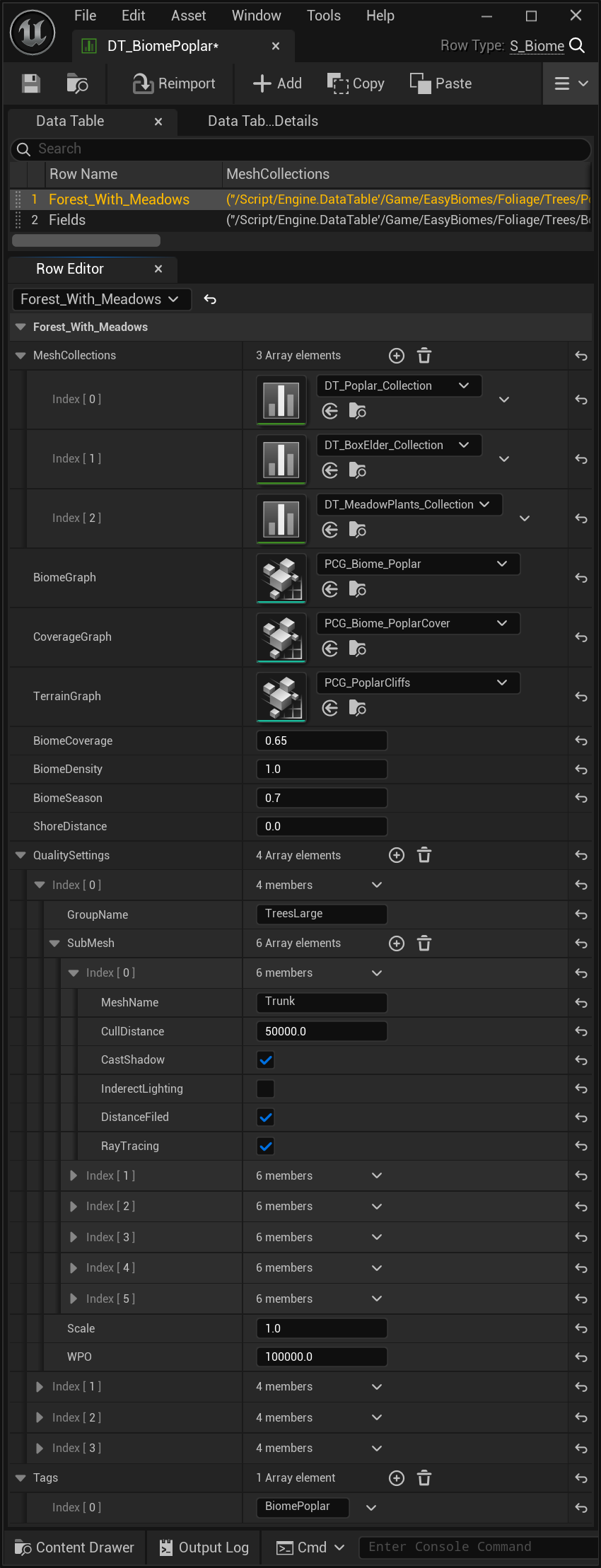
Each biome and each of its variations are stored as rows in the biome preset Data Table.
One row = one biome variation. Duplicate a row, edit its values, then select that row from the biome blueprint to use the new preset.
Row Name
Defines the biome variation preset. To create another variation, duplicate an existing row and adjust its values. Select the matching row in the biome blueprint to apply that preset.
Mesh Collections
Stores and organizes the mesh collections used by the preset. You can mix collections from other biomes, but only when the original biome already contains the same general foliage type. For example, you can add another tree collection only if the biome already contains trees. To add a collection, press + and drag the collection into the new slot. To remove one, open the arrow menu at the end of the slot and choose Delete.
DT_Poplar_Collection
Example mesh collection used by the preset.
DT_BoxElder_Collection
Another example mesh collection that can be included in the preset.
DT_MeadowPlants_Collection
Example meadow-plant mesh collection.
Generation logic
PCG Graphs
The preset points to the PCG graphs responsible for large biome meshes, ground coverage, and terrain features.
PCG Graphs
Contains the graph references used by this biome preset.
Biome Graph
The main PCG graph responsible for spawning large meshes such as trees and bushes in forest biomes.
Coverage Graph
Handles smaller elements such as grass, plants, and ground debris.
Terrain Graph
Spawns terrain features such as cliffs and large rocks.
Global preset values
Biome Parameters
These values control the overall distribution, density, seasonal foliage amount, and shoreline behavior of the preset.
Biome Coverage
Controls the balance between dense and open areas using global noise. In a forest, this determines where trees or meadows appear. A value of 1 fully covers the area with trees, while 0 produces open fields only.
Biome Density
Controls how densely trees are placed inside forested regions.
Biome Season
Controls the amount of foliage on trees and bushes. A value of 0 produces only dead trees, while 1 gives maximum leaf coverage. The value is applied per tree, so even at 0.9 a small number of dead trees can still appear.
Shore Distance
Used by water biomes to control how far the shoreline extends outward from the water.
Per-group rendering
Quality Settings
Plants and trees are organized into named groups so each group, and each mesh inside it, can have its own rendering and quality settings.
Keep the original group names. The biome system searches for meshes inside predefined groups such as Trees Large, Trees Huge, and Trees Small. Renaming those groups can prevent the system from finding the expected meshes.
Quality Settings
Contains the per-group quality configuration for the preset.
Group Name
Defines the predefined foliage group. Keep the expected group names because the biome system uses them to find the correct meshes.
Submesh
Contains quality settings for the individual meshes inside the selected foliage group.
Mesh Name
Identifies a specific tree part, such as Trunk, Branches, or Leaves01–04. Use this level to fine-tune quality settings for individual mesh parts.
Cull Distance
Sets the distance at which the mesh stops rendering.
Cast Shadow
Controls whether the mesh casts shadows.
Indirect Lighting
Controls whether the mesh contributes to indirect lighting.
Distance Field
Controls whether the mesh is included in the distance field.
Ray Tracing
Controls whether the mesh is included in ray-tracing calculations.
Scale
Sets the overall foliage scale.
WPO
Sets the distance at which WPO—wind and interaction animation—stops rendering.
Blueprint metadata
Tags
Tags let the preset pass biome-identifying metadata to the biome blueprint.
Tags
Contains the biome tags assigned by the preset.
Index […]
Defines the individual tag entry. The resulting biome tag is added to the biome blueprint.